Security Basics
Principles
- Security is economics
- Least privilege
- Defense in depth
- Complete mediation
- Accounting for human factors
Most important: know your threat model, understand what is at risk and what you can do to minimize risk
Goals
Confidentiality
Ensure only those with approved access can read data
-
Plaintext:
- Vulnerable data
- Can be easily understand once it leaks
- What you want to hide from the attacker
-
Ciphertext:
- Secured data that is indistinguishable from garble
- Hard to understand even though it leaks
- What you want the attacker to see
-
Key:
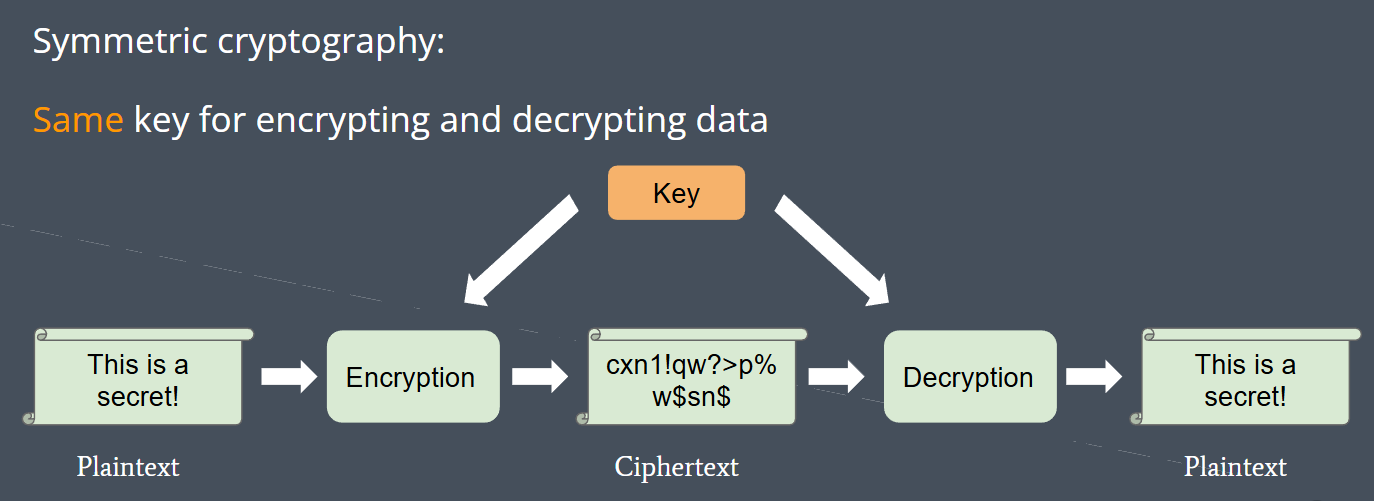
- Secret necessary for converting plaintext into ciphertext and vice-versa
-
Symmetric cryptography:
-
Asymmetric cryptography (a.k.a. public key cryptography):
- Comes in public-private key pairs where public key is for encryption and private key is for decryption (Or private key is for sign and public key is for verification)
- Public key: can be distributed to everyone
- Private key: must be kept secret
- Anyone can encrypt data with public key but only the person possessing private key can decrypt data

Integrity
Ensure data has not been tampered with
- Hash function: maps arbitrary-length data to a fixed-length string of bits (known as a hash)
- Hashes act as “summaries” of the input data
Cryptographic hash functions possess properties that make it difficult to find two inputs with the same hash (collision)
- Hash-based MACs (Message Authentication Code):
- Tag message with its hash
- The recipient can verify whether the message was modified by re-computing the hash and comparing it with the one they received
- Checksums:
- When a file is downloaded, its hash can be computed and checked against a reference hash. No need to compare bit by bit.
It is difficult to revert a hash to its input
- Password storage: store hashes of passwords instead of plaintext, so in case of server breach, only hashes would be exposed (passwords cannot be recovered from hashes). Modern algorithm also always use salt instead of single hash
- Verifying Downloads: use terminal commands (sha256sum) to ensure the integrity of downloads (such as your favorite distribution’s iso!)
Authentication
Prove the author/source of data
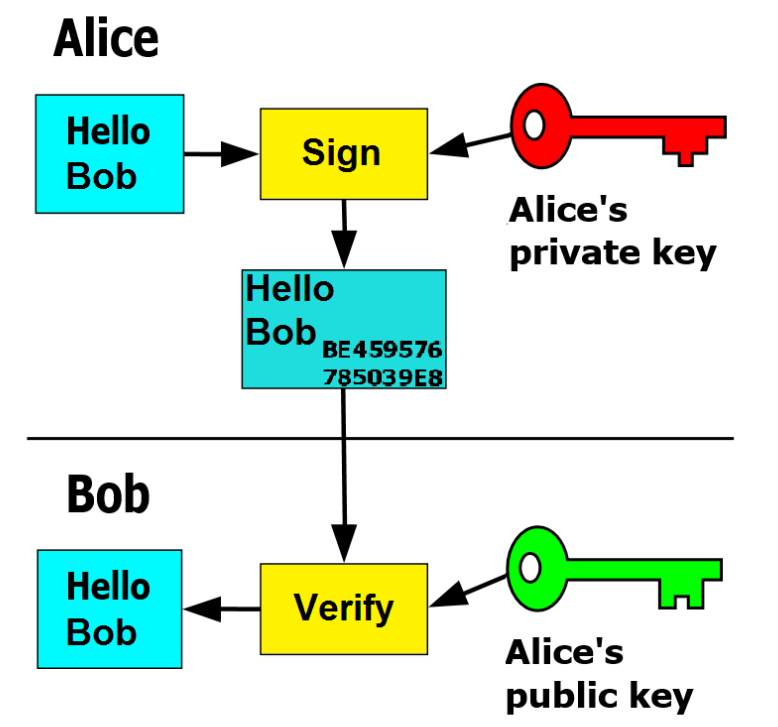
- Signature: use private key to sign a file such that anyone with the public key can verify the source of the file
- Since private key must be kept secret, only the party in possession of private key could have signed the data
- file + private key → signature
- signature + public key → verification
Availability
Ensure systems and data are available to authorized users when they need it. Mostly applicable to services hosted on servers.
- Filtering: prevent malicious requests from reaching server. (such as set maximum of failed access attempt)
- Load balancers: improve distribution of workloads across multiple resources.
- Redundancies: account for when a component in the system fails.
- Backups: when system goes down, bring it back up to latest state
GnuPG
GnuPG is a free implementation of the OpenPGP standard.
GnuPG allows you to encrypt and sign your data and communications; it features a versatile key management system, along with access modules for all kinds of public key directories.
GPG Keyring Abstraction:
GPG uses a “keyring” as a centralized location to hold all of a user’s keys. You’ll need to add/import a key to your keyring if you wish to use it and keep it around. Similarly, if you wish to share a key with someone else, you can export your key (which makes a copy of your key) and have them import it to their keyring.
- Symmetric Cryptography
gpg --symmetric [FILE]- Output a
[FILE].gpgfile which is the encrypted version of the inputted file. - You’ll need to enter a password when encrypting the file.
- Output a
gpg --decrypt [FILE].gpg- Exert on the encrypted version of original file and Output decrypted version.
- You’ll need to enter the original password.
- Asymmetric Cryptography
gpg --full-generate-keyto generate a GPG public-private key pair. It’ll ask for a password.gpg --recipient [RECIPIENT] --encrypt [FILE]which’ll encrypt[FILE]with[RECIPIENT]’s public key.gpg --decrypt [FILE].gpgwill search through your keyring and decrypt the file with the appropriate private key (if you possess the correct private key, of course).- You don’t need to specify which key to decrypt a file with because GPG-encrypted files and keys contain metadata that allow GPG to pick the correct key from the keyring to decrypt the file with.
- Signatures
gpg --sign [FILE]to sign[FILE]with your private key.gpg --verify [FILE].gpgto verify that the file was signed by one of public keys on your keyring.
Hashing Checksums
SHA1 and MD5 have been proven to no longer be cryptographically secure and are only used for checksums to ensure data integrity
sha1sum [FILE]to get the SHA1 hash of[FILE].md5sum [FILE]to get the MD5 hash of[FILE].
File Security
UNIX Permissions Model
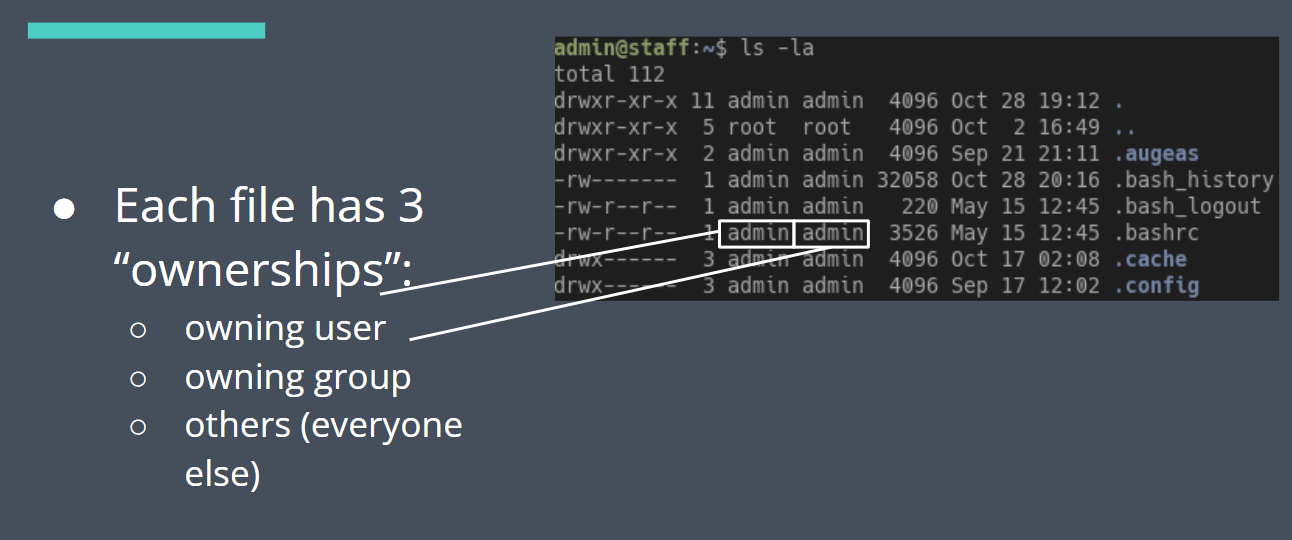
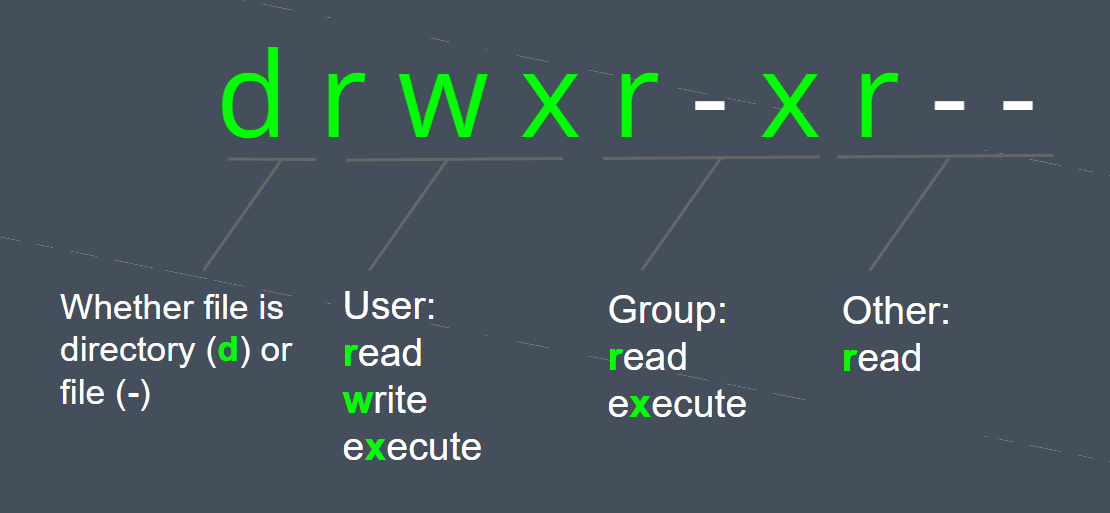
Two primary ways to modify permissions/file access:
- Change file ownership:
chown:[sudo] chown [-R] newuser:newgroup - Change file permissions directly:
chmod:[sudo] chmod [-R] [permissions] -Rfor recursively.
Poor file security is one of the easiest ways to leak information or give an attacker too much privilege on your system. If your private key’s permissions are loose, access will always denied.
Signatures and Certificates
- You can use signatures to prove the source of some data.
- But how can you prove the signer is trustworthy?
- If I gave you a public key and told you that it belonged to your bank, how do you verify this?
- This is a nontrivial problem. You have to consider things like revocation and mistakes in transmission.
Enter certificates:
-
A certificate is a cryptographically-signed message indicating trust in a public key
-
Who signs the certificate? (i.e. who do we trust to tell us someone else is trustworthy?)
-
Luckily it’s not turtles all the way down
-
Root certificates: OS’ include a number of root certificates that are the basis of trust over the network. Certificates are signed in a chain leading up to a root; if the chain is valid, the cert at the end is presumed to be trusted.
Zero Trust
- The traditional firewall + privileged intranet model doesn’t really work nowadays: remote workers, PaaS, networked apps
- Google’s done some work talking about a new approach with dynamic policies and more fine-grained access controls.
- Identifying access by user and device info and other heuristics