Conceptual Model: TCP/IP

Higher layers abstract lower layers.
Link Layer
- Communication between physically connected nodes
- MAC Addresses
- ARP/NDP
- Underlying hardware implementations are abstracted outside of TCP/IP model
- “Who can I talk to without going through a router?”
Internet Layer
- Transmitting data to different networks
- Global Routing (IP Addresses)
- No guarantees on reliability (just like real life!)
Transport Layer
- Defines protocols for communication between computers
- Dealing with unreliability of sending packets
- TCP/UDP
Application Layer
- Application-specific, actually deals with interpreting the data being sent
- Most “user-facing” functions live here
- File sharing, message passing, database access
- Examples: HTTP/FTP/DNS
Addressing and Routing
Media Access Control (MAC) Address
- Looks like this:
00:14:22:01:2a:c5 - 48 bits, divided into 6 octets
- First 3 octets identify the interface manufacturer
- Unique to each device, just like everyone in the world is unique
- Used to identify devices on local network
IP Address
- IP addresses uniquely identify a host
- IP addresses can be changed, just like our home address
IPv4
- 32 bits long, divided into 4 octets, look like:
123.123.123.123 - IPv4 octets are commonly expressed in decimal notation, although alternative formats, though rarely employed, are also permissible.
Subnet
- Sometimes, you’ll see
192.168.1.0/24 - The
/24is a subnet mask, stand for a range of IP addresses (192.168.1.0-255)- The first 24 bits of of the address: network prefix
- The last 8 bits: host identifier
/24equals to11111111.11111111.11111111.00000000
\xmeans the first x bits (network) cannot change and the remaining part (host) can be changed freely.
IPv6
- There are only 4.3 billion IPv4 addresses, but almost 8 billion people in the world - what do we do?
- IPv6 addresses contain 128 bits
- Formatted as follows:
1234:5678:89:0:ab:cd:ef:beef
Ports
- Whereas IP addresses connect hosts, ports connect process that run on such hosts.
- Only one process can be bound to a port at a time.
- Ports are represented by a 16 bit number meaning thus ranging from
0to65535.- Ports from
0to1023are system ports. 1024to49151are registered ports.- The remaining ports from
49152to65535are ephemeral ports which can be dynamically allocated for communication sessions on a per request basis.
- Ports from
Example of some system ports:
| Service | Port |
|---|---|
| SSH | 22 |
| DNS | 53 |
| HTTP | 80 |
| HTTPS | 443 |
Address Resolution Protocol (ARP)
- Translates IP address to a specific MAC address
- ARP Request: asks devices on local network who an IP address belongs to
- Kernel caches values in an “ARP table”
- Happened in local network
Route

- How do we decide where to jump to?
- Routers maintain routing tables, which tell us where to hop to next
- So before our message reach the targeted network, it should hop several times by the direction of router. (hop-by-hop routing)
Domain Name System (DNS)
- Translates domains (as found in URLs) to IP addresses
- Can manually set domain → IP mappings, or can use external DNS resolver


Types of DNS Record
- A: returns an IPv4 address (e.g.
74.125.142.147) - AAAA: returns an IPv6 address (e.g.
2607:f140:0:32::70) - CNAME: returns the canonical domain name (e.g.
uptime.ocf.iopoints tostats.uptimerobot.com) - MX: redirects email to a mail server (e.g.
MX ocf.b.epoints toaspmx.l.google.cometc.) - NS: stores the authoritative name server for a domain (e.g.
ocf.io’s NS record points tons1.o.b.e) - TXT: contains information about the domain (e.g. site verification, etc.)
- SRV: specifies a host and port for specific services
- SOA: stores administrative information about a domain (such as the email address of the admin, when the domain was last updated, and how long the server should wait between refreshes)
- TTL:
- Time to live
- Tells a DNS server or the local resolver how long it should keep the record in its cache
- Longer TTLs can speed up DNS resolution but causes updates to the zone to take longer to propagate to users
name               type             value

# A records: the IP address for a given hostname
www.example.com     A             93.184.216.34

# NS records: points to another dns server that can provide an authoritative answer for the domain
example.com         NS            ns1.dns-provider.net
example.com         NS            ns2.dns-provider.net

# CNAME records: point to the canonical name for a given alias
www.example.com    CNAME          example.com
www.example.com    CNAME          example.cdnprovider.com

# MX records: the record used by mail service
                       priority
example.com        MX     10      mail1.example.com
example.com        MX     20      mail2.example.com
# and corresponding A records
mail1.example.com  A              192.0.2.10
mail2.example.com  A              192.0.2.11
example.com
├── NS → ns1.dns-provider.net
├── NS → ns2.dns-provider.net
├── A → 93.184.216.34
├── MX → mail1.example.com
│ └── A → 192.0.2.10
└── MX → mail2.example.com
└── A → 192.0.2.11
www.example.com
└── CNAME → example.com# DNS is like a polymorphic function, returning according to the type of query.
resolve("example.com", A) → IP
resolve("example.com", MX) → mail servers
resolve("example.com", NS) → authoritative serversDNS Poisoning
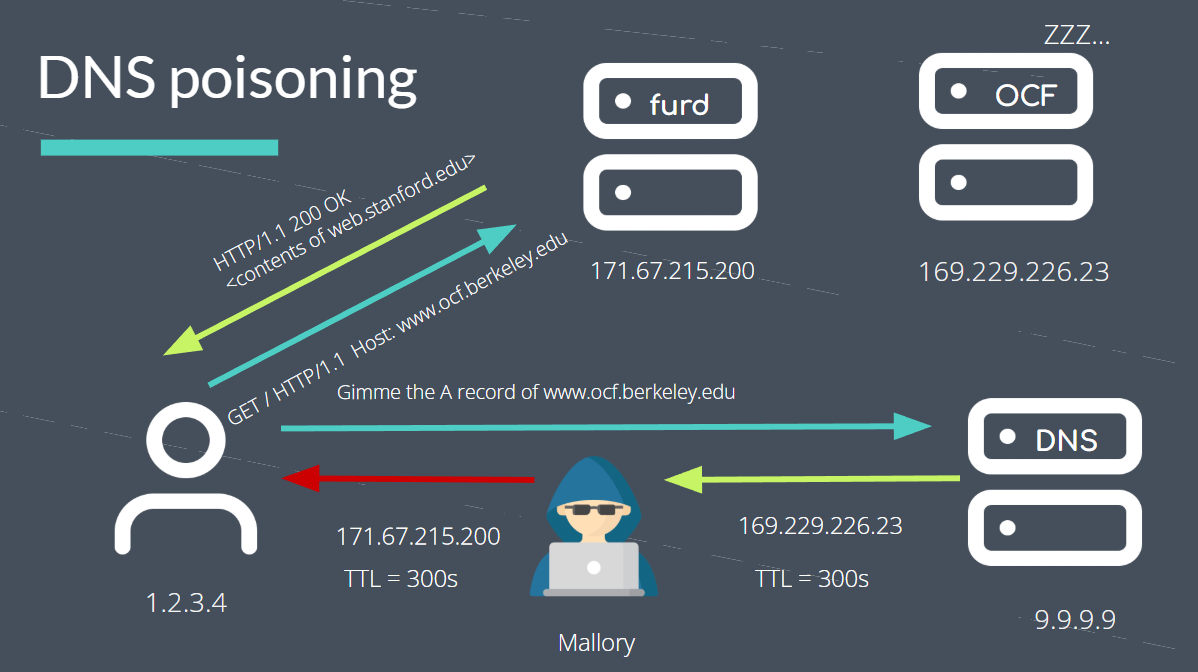
It can happen at any level of DNS resolving.
Protocols
Transmission Control Protocol (TCP)

- Ensures reliable transmission
- Connection-oriented: need to initiate a connection before sending data
- Used when reliability is more important than speed
- Examples: website loading, file transfer
User Datagram Protocol (UDP)
- No reliability guarantees
- Does not establish a connection
- Good for real-time applications where some loss is acceptable
- Examples: (lossy) streaming, gaming
Internet Control Message Protocol (ICMP)
- Not used to transmit data
- Technically not a “transport protocol”
- Used to transmit error messages and status info
- Used by diagnostic tools
Web Servers

Load Balancing
To balance and restrict the access load, keep sessions, do healthcheck and so on, LB will forward our request internally to a private IP to process.
You
 ↓ DNS
LB'IP (Public Network / Anycast / VIP)
 ↓
LB internal forwarding
 ↓
Real Web Servers (Private Network IP)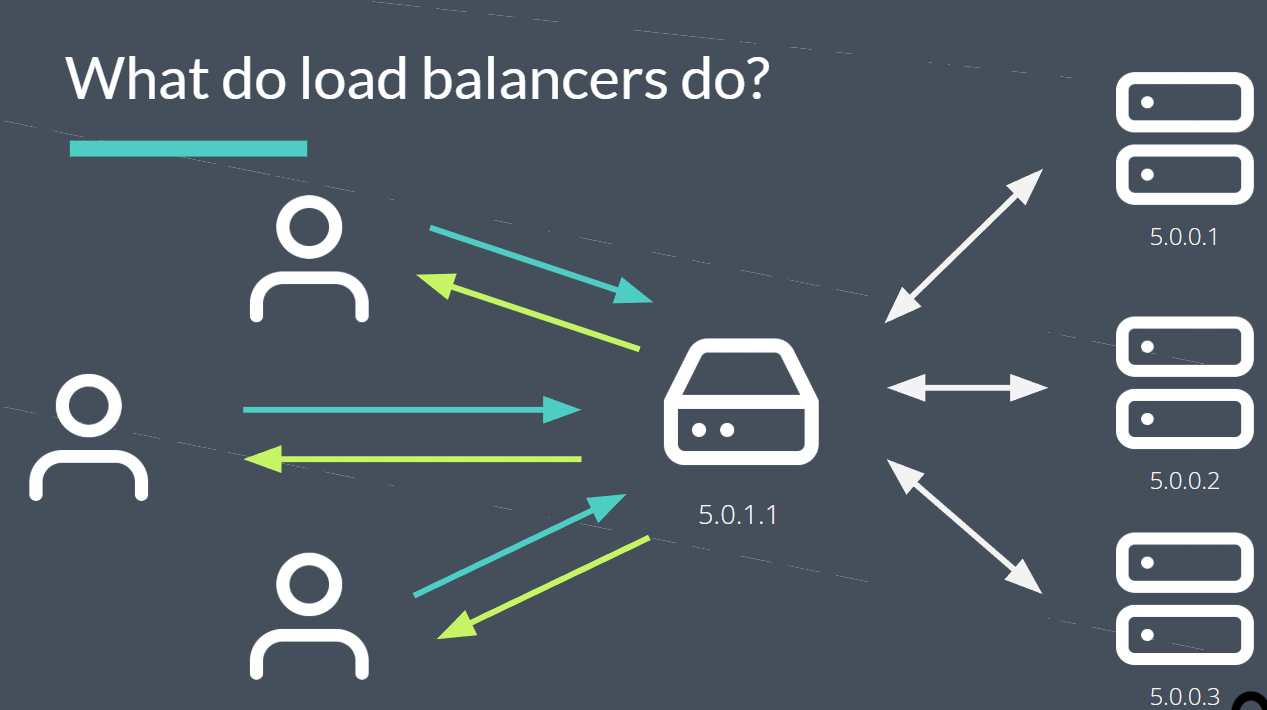
There’s many different load balancing algorithms
- Static:
- Round robin
- IP hash
- Dynamic
- Least response time
- Least connections
For a real system, several kinds of algorithms are used together to control precisely.
SysAdmin Tools
hostname: Display information about a host, IP addresses, FQDN, and etc.ping: Whether could connectping -c 4 8.8.8.8: send 4 times to8.8.8.8
ip: Look up and config network. Cheatsheetip+addr/route/link
dig: Doing DNS query and triaging DNS issues. ****dig google.com
traceroute: Provides a detailed view of the routers that a packet traverses while on its way to a destinationtraceroute google.commtr google.comis a more modern choice.
arp: Look up local network device mapping (IP ←> MAC). Display the system ARP table. Add, remove, or modify ARP entries and much more.arp -a: Check the ARP table- Use
ip neighinstead!
curl: See the contents at certain URLs. Interact with and inspect servers over several different protocols certain protocols such as HTTP, FTP, etc…wget: Quite similar tocurl, support downloading recursively. Here’s more differencetcpdump,nc
If Fails to Connect Internet…
ip addr # Whether possess a IP address
ping 192.168.1.1 # ping the gateway
ping 8.8.8.8 # ping the external network IP
dig google.com # check the DNS
traceroute google.com # check the route