C 语言的编译
多文件的 C 语言代码是如何一同编译为同一个可执行文件的呢?
例如:
#include <stdio.h>
int main() {
  puts("Hello, World!");
  return 0;
}- 预处理
gcc -E <file>
//...

extern char *ctermid (char *__s) __attribute__ ((__nothrow__ , __leaf__))
  __attribute__ ((__access__ (__write_only__, 1)));
# 941 "/usr/include/stdio.h" 3 4
extern void flockfile (FILE *__stream) __attribute__ ((__nothrow__ , __leaf__)) __attribute__ ((__nonnull__ (1)));


extern int ftrylockfile (FILE *__stream) __attribute__ ((__nothrow__ , __leaf__)) __attribute__ ((__nonnull__ (1)));


extern void funlockfile (FILE *__stream) __attribute__ ((__nothrow__ , __leaf__)) __attribute__ ((__nonnull__ (1)));
# 959 "/usr/include/stdio.h" 3 4
extern int __uflow (FILE *);
extern int __overflow (FILE *, int);
# 983 "/usr/include/stdio.h" 3 4

# 2 "test.c" 2


# 3 "test.c"
int main() {
  puts("Hello World!");
  return 0;
}
C 语言的预处理器将头文件的内容添加到了源文件中, 这一阶段处理后, 仍然只有头文件内函数的声明, 而没有定义.
- 编译
gcc -g -c <file>: -g 是保留调试信息, -c 是只编译不链接.
反汇编: objdump --section=.text --disassemble=main --source <file>.o > <output>
其中--section=.text 表示仅处理 .text 节的内容; --disassemble=main 表示仅反汇编 main 符号的代码; --source 表示显示汇编代码与源代码的对应关系.
test.o:     文件格式 elf64-x86-64


Disassembly of section .text:

0000000000000000 <main>:
#include <stdio.h>

int main() {
   0: f3 0f 1e fa           endbr64
   4: 55                    push   %rbp
   5: 48 89 e5              mov    %rsp,%rbp
  puts("Hello World!");
   8: 48 8d 05 00 00 00 00  lea    0x0(%rip),%rax        # f <main+0xf>
   f: 48 89 c7              mov    %rax,%rdi
  12: e8 00 00 00 00        call   17 <main+0x17>
  return 0;
  17: b8 00 00 00 00        mov    $0x0,%eax
}
  1c: 5d                    pop    %rbp
  1d: c3                    ret
会发现本该填写调用外部函数的地址的位置上被填写了一串 0. 那个地址显然不可能是该函数的地址. 也就是说,直到这一步, 其具体实现依然不在我们的程序中。
- 编译并链接
gcc -g -static [-o <output>] <file>:
-static 表示进行静态链接, 若不指定, 则现代的系统上可能默认使用动态链接.
使用静态链接时, 生成的二进制文件中即含有所有需要使用的函数的代码, 便于我们观察分析;
而使用动态链接时, 部分函数可能在运行时才由动态链接器进行链接, 不利于我们分析.
再次反汇编: objdump --disassemble --source <executable> > <output>
# ...

00000000004018b5 <main>:
#include <stdio.h>

int main() {
  4018b5: f3 0f 1e fa           endbr64
  4018b9: 55                    push   %rbp
  4018ba: 48 89 e5              mov    %rsp,%rbp
  puts("Hello World!");
  4018bd: 48 8d 05 4c d7 07 00  lea    0x7d74c(%rip),%rax        # 47f010 <__rseq_flags+0xc>
  4018c4: 48 89 c7              mov    %rax,%rdi
  4018c7: e8 64 34 00 00        call   404d30 <_IO_puts>
  return 0;
  4018cc: b8 00 00 00 00        mov    $0x0,%eax
}
  4018d1: 5d                    pop    %rbp
  4018d2: c3                    ret
  4018d3: 66 2e 0f 1f 84 00 00  cs nopw 0x0(%rax,%rax,1)
  4018da: 00 00 00
  4018dd: 0f 1f 00              nopl   (%rax)


# ...

0000000000404d30 <_IO_puts>:
  404d30: f3 0f 1e fa           endbr64
  404d34: 55                    push   %rbp
  404d35: 48 89 e5              mov    %rsp,%rbp
  404d38: 41 56                 push   %r14
  404d3a: 41 55                 push   %r13
  404d3c: 41 54                 push   %r12
  404d3e: 49 89 fc              mov    %rdi,%r12
  404d41: 53                    push   %rbx
  404d42: 48 83 ec 10           sub    $0x10,%rsp
  404d46: e8 15 c4 ff ff        call   401160 <_init+0x160>
  404d4b: 4c 8b 2d 7e 59 0a 00  mov    0xa597e(%rip),%r13        # 4aa6d0 <stdout>
  404d52: 48 89 c3              mov    %rax,%rbx
  404d55: 41 f7 45 00 00 80 00  testl  $0x8000,0x0(%r13)
  404d5c: 00
  404d5d: 0f 84 c5 00 00 00     je     404e28 <_IO_puts+0xf8>
  404d63: 4c 89 ef              mov    %r13,%rdi
  404d66: 8b 87 c0 00 00 00     mov    0xc0(%rdi),%eax
  404d6c: 85 c0                 test   %eax,%eax
  404d6e: 0f 85 0b 01 00 00     jne    404e7f <_IO_puts+0x14f>
  404d74: c7 87 c0 00 00 00 ff  movl   $0xffffffff,0xc0(%rdi)
  404d7b: ff ff ff
  404d7e: 4c 8b b7 d8 00 00 00  mov    0xd8(%rdi),%r14
  404d85: 48 8d 15 74 2c 0a 00  lea    0xa2c74(%rip),%rdx        # 4a7a00 <__io_vtables>
  404d8c: 4c 89 f0              mov    %r14,%rax
  404d8f: 48 29 d0              sub    %rdx,%rax
  404d92: 48 3d 2f 09 00 00     cmp    $0x92f,%rax
  404d98: 0f 87 6a 01 00 00     ja     404f08 <_IO_puts+0x1d8>
  404d9e: 48 89 da              mov    %rbx,%rdx
  404da1: 4c 89 e6              mov    %r12,%rsi
  404da4: 41 ff 56 38           call   *0x38(%r14)
  404da8: 48 39 c3              cmp    %rax,%rbx
  404dab: 0f 85 d7 00 00 00     jne    404e88 <_IO_puts+0x158>
  404db1: 48 8b 3d 18 59 0a 00  mov    0xa5918(%rip),%rdi        # 4aa6d0 <stdout>
  404db8: 48 8b 47 28           mov    0x28(%rdi),%rax
  404dbc: 48 3b 47 30           cmp    0x30(%rdi),%rax
  404dc0: 0f 83 5a 01 00 00     jae    404f20 <_IO_puts+0x1f0>
  404dc6: 48 8d 50 01           lea    0x1(%rax),%rdx
  404dca: 48 89 57 28           mov    %rdx,0x28(%rdi)
  404dce: c6 00 0a              movb   $0xa,(%rax)
  404dd1: 48 83 c3 01           add    $0x1,%rbx
  404dd5: b8 ff ff ff 7f        mov    $0x7fffffff,%eax
  404dda: 48 39 c3              cmp    %rax,%rbx
  404ddd: 48 0f 46 c3           cmovbe %rbx,%rax
  404de1: 41 f7 45 00 00 80 00  testl  $0x8000,0x0(%r13)
  404de8: 00
  404de9: 75 2d                 jne    404e18 <_IO_puts+0xe8>
  404deb: 49 8b bd 88 00 00 00  mov    0x88(%r13),%rdi
  404df2: 80 3d 5f 62 0a 00 00  cmpb   $0x0,0xa625f(%rip)        # 4ab058 <__libc_single_threaded>
  404df9: 8b 57 04              mov    0x4(%rdi),%edx
  404dfc: 0f 84 ae 00 00 00     je     404eb0 <_IO_puts+0x180>
  404e02: 85 d2                 test   %edx,%edx
  404e04: 0f 85 aa 00 00 00     jne    404eb4 <_IO_puts+0x184>
  404e0a: 48 c7 47 08 00 00 00  movq   $0x0,0x8(%rdi)
  404e11: 00
  404e12: c7 07 00 00 00 00     movl   $0x0,(%rdi)
  404e18: 48 83 c4 10           add    $0x10,%rsp
  404e1c: 5b                    pop    %rbx
  404e1d: 41 5c                 pop    %r12
  404e1f: 41 5d                 pop    %r13
  404e21: 41 5e                 pop    %r14
  404e23: 5d                    pop    %rbp
  404e24: c3                    ret
  404e25: 0f 1f 00              nopl   (%rax)
  404e28: 49 8b bd 88 00 00 00  mov    0x88(%r13),%rdi
  404e2f: 80 3d 22 62 0a 00 00  cmpb   $0x0,0xa6222(%rip)        # 4ab058 <__libc_single_threaded>
  404e36: 64 4c 8b 34 25 10 00  mov    %fs:0x10,%r14
  404e3d: 00 00
  404e3f: 48 8b 47 08           mov    0x8(%rdi),%rax
  404e43: 75 53                 jne    404e98 <_IO_puts+0x168>
  404e45: 49 39 c6              cmp    %rax,%r14
  404e48: 0f 84 aa 00 00 00     je     404ef8 <_IO_puts+0x1c8>
  404e4e: 31 c0                 xor    %eax,%eax
  404e50: ba 01 00 00 00        mov    $0x1,%edx
  404e55: f0 0f b1 17           lock cmpxchg %edx,(%rdi)
  404e59: 0f 85 e1 00 00 00     jne    404f40 <_IO_puts+0x210>
  404e5f: 49 8b 85 88 00 00 00  mov    0x88(%r13),%rax
  404e66: 48 8b 3d 63 58 0a 00  mov    0xa5863(%rip),%rdi        # 4aa6d0 <stdout>
  404e6d: 4c 89 70 08           mov    %r14,0x8(%rax)
  404e71: 8b 87 c0 00 00 00     mov    0xc0(%rdi),%eax
  404e77: 85 c0                 test   %eax,%eax
  404e79: 0f 84 f5 fe ff ff     je     404d74 <_IO_puts+0x44>
  404e7f: 83 f8 ff              cmp    $0xffffffff,%eax
  404e82: 0f 84 f6 fe ff ff     je     404d7e <_IO_puts+0x4e>
  404e88: b8 ff ff ff ff        mov    $0xffffffff,%eax
  404e8d: e9 4f ff ff ff        jmp    404de1 <_IO_puts+0xb1>
  404e92: 66 0f 1f 44 00 00     nopw   0x0(%rax,%rax,1)
  404e98: 48 85 c0              test   %rax,%rax
  404e9b: 75 a8                 jne    404e45 <_IO_puts+0x115>
  404e9d: c7 07 01 00 00 00     movl   $0x1,(%rdi)
  404ea3: 4c 89 77 08           mov    %r14,0x8(%rdi)
  404ea7: e9 b7 fe ff ff        jmp    404d63 <_IO_puts+0x33>
  404eac: 0f 1f 40 00           nopl   0x0(%rax)
  404eb0: 85 d2                 test   %edx,%edx
  404eb2: 74 1c                 je     404ed0 <_IO_puts+0x1a0>
  404eb4: 83 ea 01              sub    $0x1,%edx
  404eb7: 89 57 04              mov    %edx,0x4(%rdi)
  404eba: 48 83 c4 10           add    $0x10,%rsp
  404ebe: 5b                    pop    %rbx
  404ebf: 41 5c                 pop    %r12
  404ec1: 41 5d                 pop    %r13
  404ec3: 41 5e                 pop    %r14
  404ec5: 5d                    pop    %rbp
  404ec6: c3                    ret
  404ec7: 66 0f 1f 84 00 00 00  nopw   0x0(%rax,%rax,1)
  404ece: 00 00
  404ed0: 48 c7 47 08 00 00 00  movq   $0x0,0x8(%rdi)
  404ed7: 00
  404ed8: 87 17                 xchg   %edx,(%rdi)
  404eda: 83 fa 01              cmp    $0x1,%edx
  404edd: 0f 8e 35 ff ff ff     jle    404e18 <_IO_puts+0xe8>
  404ee3: 89 45 dc              mov    %eax,-0x24(%rbp)
  404ee6: e8 25 68 00 00        call   40b710 <__lll_lock_wake_private>
  404eeb: 8b 45 dc              mov    -0x24(%rbp),%eax
  404eee: e9 25 ff ff ff        jmp    404e18 <_IO_puts+0xe8>
  404ef3: 0f 1f 44 00 00        nopl   0x0(%rax,%rax,1)
  404ef8: 83 47 04 01           addl   $0x1,0x4(%rdi)
  404efc: e9 62 fe ff ff        jmp    404d63 <_IO_puts+0x33>
  404f01: 0f 1f 80 00 00 00 00  nopl   0x0(%rax)
  404f08: e8 a3 02 00 00        call   4051b0 <_IO_vtable_check>
  404f0d: 48 8b 3d bc 57 0a 00  mov    0xa57bc(%rip),%rdi        # 4aa6d0 <stdout>
  404f14: e9 85 fe ff ff        jmp    404d9e <_IO_puts+0x6e>
  404f19: 0f 1f 80 00 00 00 00  nopl   0x0(%rax)
  404f20: be 0a 00 00 00        mov    $0xa,%esi
  404f25: e8 d6 3a 00 00        call   408a00 <__overflow>
  404f2a: 83 f8 ff              cmp    $0xffffffff,%eax
  404f2d: 0f 85 9e fe ff ff     jne    404dd1 <_IO_puts+0xa1>
  404f33: e9 50 ff ff ff        jmp    404e88 <_IO_puts+0x158>
  404f38: 0f 1f 84 00 00 00 00  nopl   0x0(%rax,%rax,1)
  404f3f: 00
  404f40: e8 0b 67 00 00        call   40b650 <__lll_lock_wait_private>
  404f45: e9 15 ff ff ff        jmp    404e5f <_IO_puts+0x12f>
  404f4a: f3 0f 1e fa           endbr64
  404f4e: 48 89 c3              mov    %rax,%rbx
  404f51: e9 2a c2 ff ff        jmp    401180 <_IO_puts.cold>
  404f56: 66 2e 0f 1f 84 00 00  cs nopw 0x0(%rax,%rax,1)
  404f5d: 00 00 00

# ...
主函数里那一句 call 后面已经被填入了一个地址.
从反汇编代码中我们也可以看到, 这个地址就在这个可执行文件里, 其中包含我们所调用的函数的具体实现.
由此,外部函数的实现是在链接这一步骤中被插入到最终的可执行文件中的, 而不是直接以源代码形式和我们编写的其它源代码一起编译.
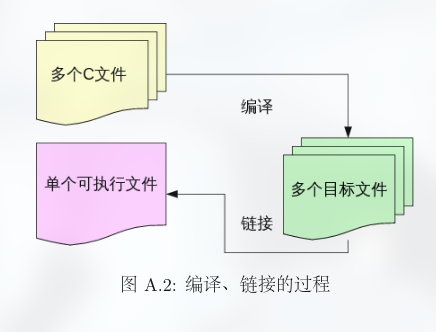
对于含有多个.c 文件的工程来说, 编译器会首先将所有的 .c 文件以文件为单位, 编译成 .o 文件.
最后再将所有的.o 文件以及函数库链接在一起, 形成最终的可执行文件.
ELF
ELF for Executable and Linkable Format
目标文件和可执行文件都是用 ELF 格式记录的, 至于具体类型则在 ELF 文件头 里说明.
格式
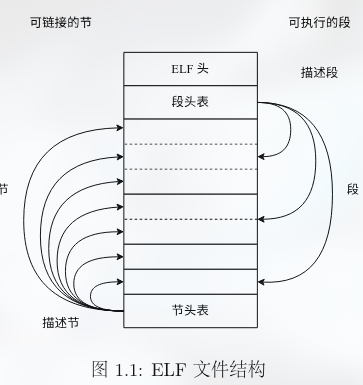
ELF 由一个头, 两个表组成.
- ELF 头, 包括程序的基本信息, 比如体系结构和操作系统,同时也包含了节头表和段头表相对文件的偏移量(offset).
- 段头表(或程序头表, program header table), 主要包含程序中各个段(segment)的信息, 段的信息需要在运行时刻使用.
- 节头表(section header table), 主要包含程序中各个节(section)的信息,节的信息需要在程序编译和链接的时候使用.
- 段头表中的每一个表项, 记录了该段数据载入内存时的目标位置等, 记录了用于指导应用程序加载的各类信息.
- 节头表中的每一个表项, 记录了该节程序的代码段(
.text)或数据段(.data)等各个段的内容的类型, 主要是链接器在链接的过程中需要使用.
因此段和节是程序的两种不同看待数据的方式:
- 组成可重定位文件, 参与可执行文件和可共享文件的链接. 此时使用节头表.
- 组成可执行文件或者可共享文件, 在运行时为加载器提供信息. 此时使用段头表.
实际上, ELF 头就是一个如下的结构体:
#define EI_NIDENT (16)

typedef struct {
 unsigned char e_ident[EI_NIDENT]; /* Magic number and other info */
 Elf32_Half e_type;    /* Object file type */
 Elf32_Half e_machine;    /* Architecture */
 Elf32_Word e_version;    /* Object file version */
 Elf32_Addr e_entry;    /* Entry point virtual address */
 Elf32_Off e_phoff;    /* Program header table file offset */
 Elf32_Off e_shoff;    /* Section header table file offset */
 Elf32_Word e_flags;    /* Processor-specific flags */
 Elf32_Half e_ehsize;    /* ELF header size in bytes */
 Elf32_Half e_phentsize;    /* Program header table entry size */
 Elf32_Half e_phnum;    /* Program header table entry count */
 Elf32_Half e_shentsize;    /* Section header table entry size */
 Elf32_Half e_shnum;    /* Section header table entry count */
 Elf32_Half e_shstrndx;    /* Section header string table index */
} Elf32_Ehdr;

/* Fields in the e_ident array.  The EI_* macros are indices into the
   array.  The macros under each EI_* macro are the values the byte
   may have.  */

#define EI_MAG0 0    /* File identification byte 0 index */
#define ELFMAG0 0x7f /* Magic number byte 0 */

#define EI_MAG1 1   /* File identification byte 1 index */
#define ELFMAG1 'E' /* Magic number byte 1 */

#define EI_MAG2 2   /* File identification byte 2 index */
#define ELFMAG2 'L' /* Magic number byte 2 */

#define EI_MAG3 3   /* File identification byte 3 index */
#define ELFMAG3 'F' /* Magic number byte 3 */
而段和节头表是一系列结构体, 每个结构体如下:
/* Section segment header.  */
typedef struct {
 Elf32_Word sh_name;  /* Section name */
 Elf32_Word sh_type;  /* Section type */
 Elf32_Word sh_flags;  /* Section flags */
 Elf32_Addr sh_addr;  /* Section addr */
 Elf32_Off sh_offset;  /* Section offset */
 Elf32_Word sh_size;  /* Section size */
 Elf32_Word sh_link;  /* Section link */
 Elf32_Word sh_info;  /* Section extra info */
 Elf32_Word sh_addralign; /* Section alignment */
 Elf32_Word sh_entsize;  /* Section entry size */
} Elf32_Shdr;

/* Program segment header.  */

typedef struct {
 Elf32_Word p_type;   /* Segment type */
 Elf32_Off p_offset;  /* Segment file offset */
 Elf32_Addr p_vaddr;  /* Segment virtual address */
 Elf32_Addr p_paddr;  /* Segment physical address */
 Elf32_Word p_filesz; /* Segment size in file */
 Elf32_Word p_memsz;  /* Segment size in memory */
 Elf32_Word p_flags;  /* Segment flags */
 Elf32_Word p_align;  /* Segment alignment */
} Elf32_Phdr;
解析
我们可以用 readelf 工具来分析 ELF 文件内容, 常用参数有:
-h: 读取 ELF 头-S: 读取节头表
Kernel 启动
启动并运行一个操作系统, 我们需要将其加载到内存的正确位置上.
那么, 何谓正确? 如何控制?
MIPS 内存布局
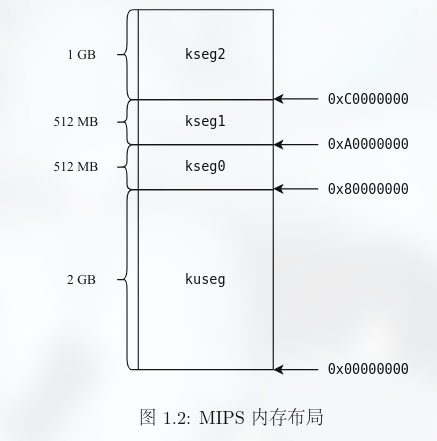
我们先看 MIPS 的内存布局, 从而确定我们要把内核加载到哪里.
 o     4G ----------->  +----------------------------+------------0x100000000
 o                      |       ...                  |  kseg2
 o      KSEG2    -----> +----------------------------+------------0xc000 0000
 o                      |          Devices           |  kseg1
 o      KSEG1    -----> +----------------------------+------------0xa000 0000
 o                      |      Invalid Memory        |   /|\
 o                      +----------------------------+----|-------Physical Memory Max
 o                      |       ...                  |  kseg0
 o      KSTACKTOP-----> +----------------------------+----|-------0x8040 0000-------end
 o                      |       Kernel Stack         |    | KSTKSIZE            /|\
 o                      +----------------------------+----|------                |
 o                      |       Kernel Text          |    |                    PDMAP
 o      KERNBASE -----> +----------------------------+----|-------0x8002 0000    |
 o                      |      Exception Entry       |   \|/                    \|/
 o      ULIM     -----> +----------------------------+------------0x8000 0000-------
 o                      |         User VPT           |     PDMAP                /|\
 o      UVPT     -----> +----------------------------+------------0x7fc0 0000    |
 o                      |           pages            |     PDMAP                 |
 o      UPAGES   -----> +----------------------------+------------0x7f80 0000    |
 o                      |           envs             |     PDMAP                 |
 o  UTOP,UENVS   -----> +----------------------------+------------0x7f40 0000    |
 o  UXSTACKTOP -/       |     user exception stack   |     PTMAP                 |
 o                      +----------------------------+------------0x7f3f f000    |
 o                      |                            |     PTMAP                 |
 o      USTACKTOP ----> +----------------------------+------------0x7f3f e000    |
 o                      |     normal user stack      |     PTMAP                 |
 o                      +----------------------------+------------0x7f3f d000    |
 a                      |                            |                           |
 a                      ~~~~~~~~~~~~~~~~~~~~~~~~~~~~~~                           |
 a                      .                            .                           |
 a                      .                            .                         kuseg
 a                      .                            .                           |
 a                      |~~~~~~~~~~~~~~~~~~~~~~~~~~~~|                           |
 a                      |                            |                           |
 o       UTEXT   -----> +----------------------------+------------0x0040 0000    |
 o                      |      reserved for COW      |     PTMAP                 |
 o       UCOW    -----> +----------------------------+------------0x003f f000    |
 o                      |   reversed for temporary   |     PTMAP                 |
 o       UTEMP   -----> +----------------------------+------------0x003f e000    |
 o                      |       invalid memory       |                          \|/
 a     0 ------------>  +----------------------------+ ----------------------------
o- kuseg 0x00000000-0x7FFFFFFF(2 GB):
这一段是用户态下唯一可用的地址空间(内核态下也可使用这段地址空间), 大小为 2 GB, 也就是 MIPS 约定的用户内存空间.
需要通过 MMU(Memory Management Unit)中的 TLB 进行虚拟地址到物理地址的变换.
对这段地址的存取都会通过 cache. - kseg0 0x80000000-0x9FFFFFFF(512 MB):
这一段是内核态下可用的地址, MMU 将地址的最高位清零(& 0x7fffffff)就得到物理地址用于访存.
也就是说, 这段的虚拟地址被连续地映射到物理地址的低 512 MB 空间.
对这段地址的存取都会通过 cache. - kseg1 0xA0000000-0xBFFFFFFF(512 MB):
与 kseg0 类似, 这段地址也是内核态下可用的地址, MMU 将虚拟地址的高三位清零 (& 0x1fffffff) 就得到物理地址用于访存.
这段虚拟地址也被连续地映射到物理地址的低 512 MB 空间.
但是对这段地址的存取不通过 cache, 往往在这段地址上使用 MMIO(Memory-Mapped I/O)技术来访问外设. - kseg2 0xC0000000-0xFFFFFFFF(1 GB):
这段地址只能在内核态下使用并且需要 MMU 中 TLB 将虚拟地址转换为物理地址.
对这段地址的存取都会通过 cache.
我们将内核的 .text、.data、.bss 段都放到 kseg0 中.
因为 TLB 需要内核配置管理, 我们无法在没有载入内核的时候使用 TLB, 因此 kseg2 必然不行.
而 kseg1 不经过 cache, 一般只有访问外设的时候使用.
Note
PTMAP是4KB 的区域, 对应一个 PTE 条目;PDMAP是一个 4MB 的区域, 对应一个 PDE 条目. 详细请见 Memory Management.
Linker Script
接下来, 我们要看看如何控制内核被加载到这个位置.
编译器在生成 ELF 文件的时候就已经记录了各节需要被加载到的位置, 并且这个可执行文件实际上是由链接器产生的,
因此我们要控制它的行为, 让它链接的时候产生正确的地址, 这就是 Linker Script 所做的事.
Linker Script 中记录了各个节应该如何映射到段, 以及各个段应该被加载到的位置.
节的详解
在链接过程, 目标文件被视为节的集合, 并使用节头表, 描述各个节的组织. 其中最为重要的三个节为 .text、.data、.bss, 作用为:
.text保存可执行文件的操作指令..data保存已初始化的全局变量和静态变量。.bss保存未初始化的全局变量和静态变量。
以下一个例子可以看出来:
#include <stdio.h>
char msg[] = "Hello, World!";
int count;
int main() {
  printf("msg: %X\n", msg);
  printf("count: %X\n", &count);
  printf("main: %X\n", main);
  return 0;
}
/*
msg: CA29C004
count: CA29E024
main: CA29B139
*/
$ readelf -S link
There are 30 section headers, starting at offset 0x36d8:
Section Headers:
[Nr] Name Type Address Offset
Size EntSize Flags Link Info Align
...
[12] .text PROGBITS 0000000000001040 00001040
000000000000015e 0000000000000000 AX 0 0 16
...
[24] .data PROGBITS 0000000000004008 00003008
0000000000000018 0000000000000000 WA 0 0 8
[25] .bss NOBITS 0000000000004020 00003020
0000000000000008 0000000000000000 WA 0 0 4
...这里面似乎对不太上, 其实是一些现代 gcc 设置导致的. 如果关闭的话, 会类似于:
80D4188
80D60A0
8048AAC

[Nr] Name Type Addr Off Size ES Flg Lk Inf Al
[ 4] .text PROGBITS 08048140 000140 0620e4 00 AX 0 0 16
[22] .data PROGBITS 080d4180 08b180 000f20 00 WA 0 0 32
[23] .bss NOBITS 080d50c0 08c0a0 00136c 00 WA 0 0 64
就可以对上了.
Linker Script 的编写
SECTIONS
{
 . = 0x10000;
 .text : { *(.text) }
 . = 0x8000000;
 .data : { *(.data) }
 .bss : { *(.bss) }
}.(Location Counter): 一个写字时的”光标”. 设置.等于多少, 接下来的内容就从哪里开始写, 在SECTION开始时为 0.- (.text): 这是一个通配符。意思是把所有输入的 .o 文件里的代码段, 全都塞进新定义的这个
.text块里.
使用 gcc -o test test.c -T test.lds 来指定使用这个 linker script 进行编译.
段是由节组合而成的, 节的地址被调整了, 那么最终段的地址也会相应地被调整.
示例:
/*
 * Set the architecture to mips.
 */
OUTPUT_ARCH(mips)

/*
 * Set the ENTRY point of the program to _start.
 */
ENTRY(_start)

SECTIONS {
 . = 0x80020000;

 .text = { *(.text) }

 .data = { *(.data) }

 bss_start = .;
 .bss = { *(.bss) }

 bss_end = .;
 . = 0x80400000;
 end = . ;
}
其中, 三部分是连续的, 都在 Kernel Text(见上图)的位置.
特别地,
.bss前后标记开始结束, 是因为里面存的是未初始化的变量, 在磁盘不占用空间, 只记录大小
内核开发者需要亲自动手写一段循环代码, 把这一块区域全部填成 0.
为了让代码知道从哪开始填和填到哪结束, 就必须在 Linker Script 里用bss_start和bss_end标记出边界.ENTRY(_start)的作用
在 ELF 文件的文件头里写下一个地址. 当你编译完内核生成 ELF 文件时, 链接器会查阅 Linker Script:
链接器看到ENTRY(_start), 它去所有的 .o 文件里找_start这个符号对应的内存地址(比如 0x80020000) 并把这个地址填入 ELF Header 的e_entry字段.