What is Distro?
Distro is the abbreviation of Distribution.
- Linux == kernel
- Manage resources and allocates to programs
- Everything else in the OS make it usable.
- Program: bash, cat, ls, etc.
- Init system
- Package manager
- Linux kernel + other software == operation system
- So different Linux distro make different choices about everything besides the kernel:
- What other software to choose?
- How to manage these software?
- How should using the system work for users?
- So different Linux distro make different choices about everything besides the kernel:
Package Managers
What is Package Manager
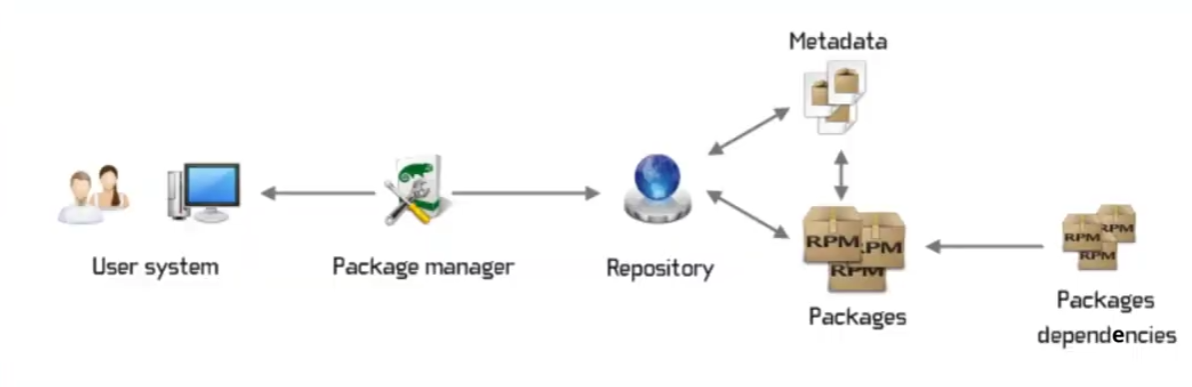
A centralized system for managing package metadata
- Each Linux distribution maintains repositories that contain lists of packages available to download
- Volunteers (package maintainers), on behalf of distributions, are responsible for packaging developers’ software
- Each distribution has processes and policies for how software should be packaged
Why packages matter?
In most cases, the core source code of a software is the same across Linux distros (or differs only by version or small distribution-specific patches).
However, binary packages are generally not interchangeable between distributions because each distribution defines its own system assumptions such as the position of installing, the version of dependencies and so on.
So, to run correctly, software must usually be rebuilt and repackaged separately for each Linux distro in order to install and run correctly.
Debian
Package Manage System
- Packages end in
.deb - Backend:
dpkg: Just install a package - Frontend:
apt:- Reads from package repositories
- Handle dependency resolution
- Dispatches to
dpkginternally
Note
aptis a CLI for end-users. For scripts, useapt-getinstead, which has more fixed output form.
dpkg Commands
Using dpkg, you also can inspect packages and fix broken installs.
dpkg -i <packagefilename>:- Install local packages
dpkg --remove <package>dpkg -I <packagefilename>- Inspect a package for more information about the package
dpkg --configure -a- Fix/Configure all unpacked but unfinished installs
apt Commands
apt update- Fetches latest lists of available packages from repositories
- Doesn’t actually update any installed software!
apt search <package name>- Searches for available packages in the catalog
apt install <package name>- Installs packages from catalog
- Also installs its dependencies!
apt remove <package name>- Remove specified packages
- But won’t remove their dependencies
apt upgrade / apt dist-upgrade- Updates installed packages
apt install
- Reads from the package lists
- Finds out what dependencies the package needs
- Checks what packages are already installed
- Download the packages (if not installing a local
.deb) - Verify integrity of packages
- Unpacks them and copies the files over
- Processes any remaining triggers
- Triggers are events such as scripts that run post-install
- An example is starting the application as a service
How does Debian know which package to install?
Lookup /etc/apt/sources.list and /etc/apt/sources.list.d/*.
sources.list / sources.list.d- apt update (Download software catalog)
- apt install xxx(Choose a appropriate version)
sources.list:
# deb|URL                               Suite|Archive Components
  deb http://archive.ubuntu.com/ubuntu/ jammy main restricted
Creating Packages

Huge pain in the butt
- Download software/write it
- Make sure everything configured
- List dependencies, metadata (version, author, etc.)
- Make sure linked libraries are in place
- Use tool to make package
FPM: A Ruby Gem and makes packaging (slightly) less painful
sudo apt install ruby-devsudo gem install fpmfpm -s dir -t deb -n [name here] -v [version #] -C [the directory with the /usr folder]
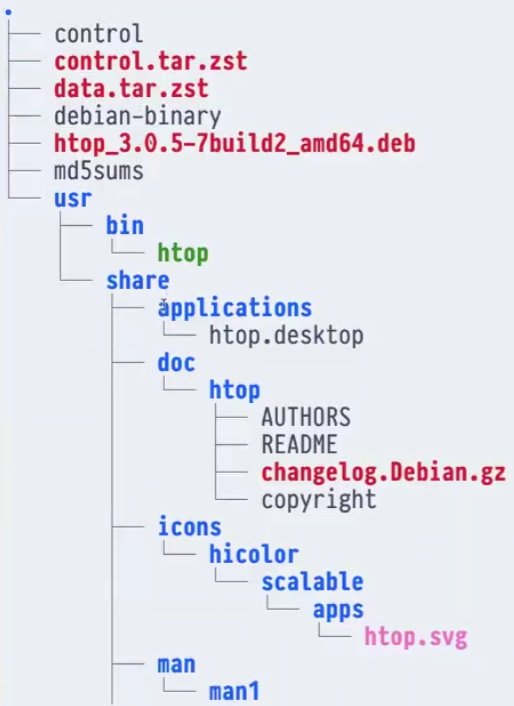
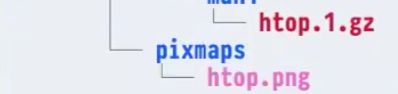
Package Layout

They will get merged with computer directories.
For example:
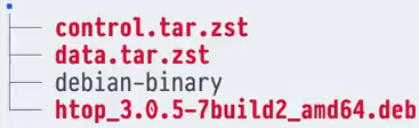
Then extract: