A programming language that behaves like a calculator that we create.
The Pair Class
The pair class represents Scheme pairs and lists.
A list is a pair whose second element is either a list or nil.
class Pair:
    def __init__(self, first, second):
        self.first = first
        self.second = second # Second is either a well-formed list or nil for a Pair to be a well-formed list.
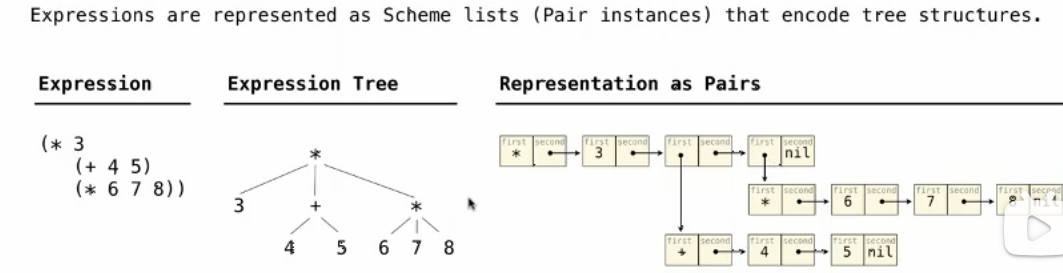
Scheme expression are represented as Scheme lists! (Data representation equals to the source code representation: Homoiconic)
Syntax
The calculator language has primitive expressions and call expressions.
These two things are like these two things in Scheme.
Semantics
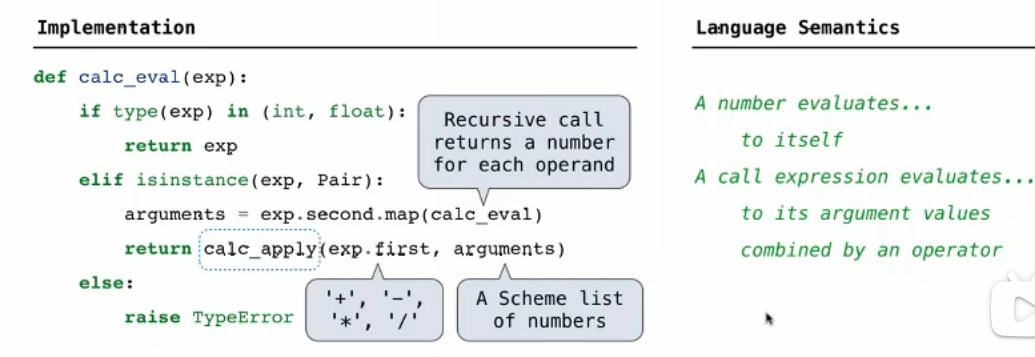
The value of a calculator expression is defined recursively.
- Primitive: A number evaluates to itself.
- Call: A call expression evaluates to its argument values(operands which is evaluated by another recursive call) combined by an operator.
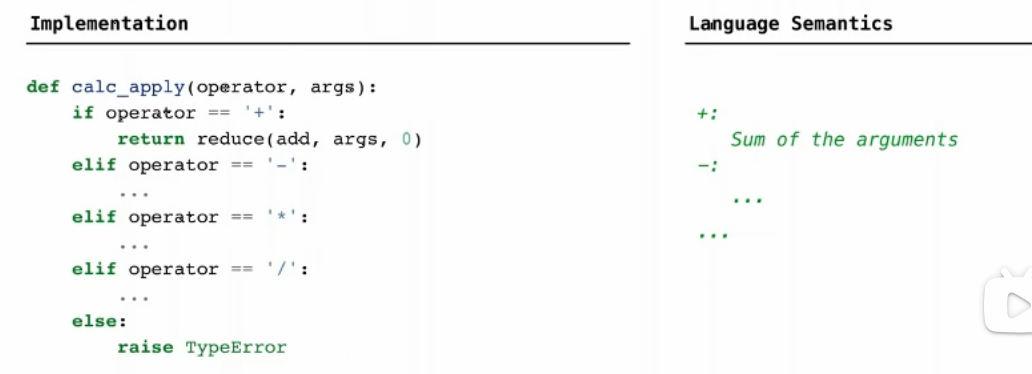
- +: Sum of the arguments
- *: Product of the arguments
- -: If one argument, negate it. If more than one, subtract the rest from the first.
- /: If one argument, invert it. If more than one, divide the rest from the first.
Evaluation
The eval Function
The eval function computes the value of an expression represented as a Scheme list, which is always a number.
It is a generic function that dispatches on the type of the expression (primitive or call).
Applying Built-in Operator
The apply function applies some operation to a (Scheme) list of argument values.
In calculator language, all operations are named by built-in operators: +, -, *, /
def calc_apply(operator, args):
    """Apply the named operator to a list of args.
    >>> calc_apply('+', as_scheme_list(1, 2, 3))
    6
    >>> calc_apply('-', as_scheme_list(10, 1, 2, 3))
    4
    >>> calc_apply('-', as_scheme_list(10))
    -10
    >>> calc_apply('*', nil)
    1
    >>> calc_apply('*', as_scheme_list(1, 2, 3, 4, 5))
    120
    >>> calc_apply('/', as_scheme_list(40, 5))
    8.0
    >>> calc_apply('/', as_scheme_list(10))
    0.1
    """
    if not isinstance(operator, str):
        raise TypeError(str(operator) +'is not a symbol')
    if operator == '+':
        return reduce(add, args, 0)
    elif operator == '-':
        if len(args) == 0:
            raise TypeError(operator +'requires at least 1 argument')
        elif len(args) == 1:
            return -args.first
        else:
            return reduce(sub, args.second, args.first)
    elif operator == '*':
        return reduce(mul, args, 1)
    elif operator == '/':
        if len(args) == 0:
            raise TypeError(operator +'requires at least 1 argument')
        elif len(args) == 1:
            return 1/args.first
        else:
            return reduce(truediv, args.second, args.first)
    else:
        raise TypeError(operator +'is an unknown operator')
Interactive Interpreter
The user interface for many programming language is an interactive interpreter.
Read-Eval-Print Loop
graph LR
    classDef startend fill:#F5EBFF,stroke:#BE8FED,stroke-width:2px
    classDef process fill:#E5F6FF,stroke:#73A6FF,stroke-width:2px
    classDef decision fill:#FFF6CC,stroke:#FFBC52,stroke-width:2px

    A(Start):::startend --> B(Print a prompt.):::process
    B --> C(Read text input from the user.):::process
    C --> D(Parse the text input into an expression.):::process
    D --> E(Evaluate the expression.):::process
    E --> F{Whether there is any error?}:::decision
    F -->|Yes| G(Report those errors):::process
    G --> B(Print a prompt.):::process
    F -->|No| H(Print the value of the expression.):::process
    H --> B(Print a prompt.):::process
def read_eval_print_loop():
    """Run a read-eval-print loop for Calculator."""
    while True:
        try:
            src = buffer_input()
            while src.more_on_line:
                expression = scheme_read(src)
                print(calc_eval(expression))
        except (SyntaxError, TypeError, ValueError, ZeroDivisionError) as err:
            print(type(err).__name__ + ':', err)
        except (KeyboardInterrupt, EOFError):  # <Control>-D, etc.
            print('Calculation completed.')
            return
Raising Exceptions
Exceptions are raised within lexical analysis, syntactic analysis, eval, and apply.
Handling Exceptions
An interactive interpreter should print information about each error.
A well-designed interactive interpreter should not halt completely on an error, so that the user has an opportunity to try again in the current environment.
How to accomplish this:
Put both parsing and evaluation within a try statement.
And put all of these within a while statement to go back and try again.