Process and Thread
Why Process Abstraction
Goals of an Operating System
- Referee
- Manages access to shared resources (memory, CPU, etc.)
- Isolates & protects workloads from each other
- Illusionist
- Provide abstractions of physical resources
- Each program thinks it has a dedicated machine
- Glue
- Provide common interfaces
- File system, networking, window management, etc.
How Process Achieve these
- User code must run in a process
- Referee → Restricted execution environment (privilege levels, only allowed to access what it owns)
- Illusionist → Own virtual address space (~infinite memory from point of view of the program)
- Glue → I/O (APIs for files, sockets, etc.)
- Each running program has its own process
Multithreaded Process

- A process may have one or more threads.
- Threads encapsulate concurrency
- Share the same address space, resources, etc.
- Process are for isolation
- Communication between processes much harder than between threads
Summary
- A process is a single instance of a program
- Processes are isolated from one another and have their own memory, threads, etc.
- The OS provides common interfaces for processes to use for I/O, etc.
What Creates Processes
The answer is … Process!
By fork - join pattern
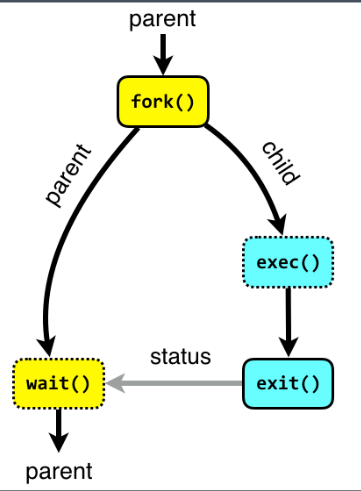
- fork: creates a copy of the current process
- exec: restart current process with a different executable
- wait: wait for a process to finish, retrieves the exit status
- OS needs to keep exit status somewhere, even if the parent doesn’t wait
- If parent never waits, this causes a resource leak! (Zombie process)
Construct a tree structure:
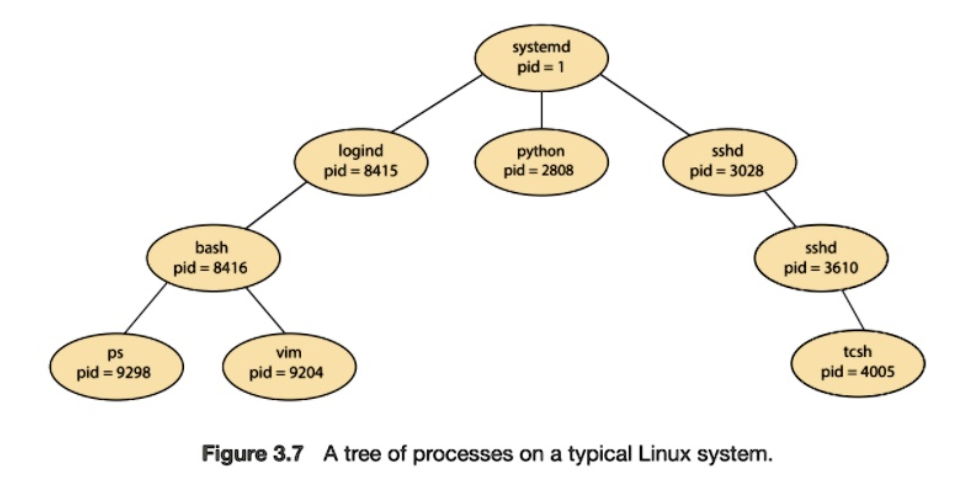
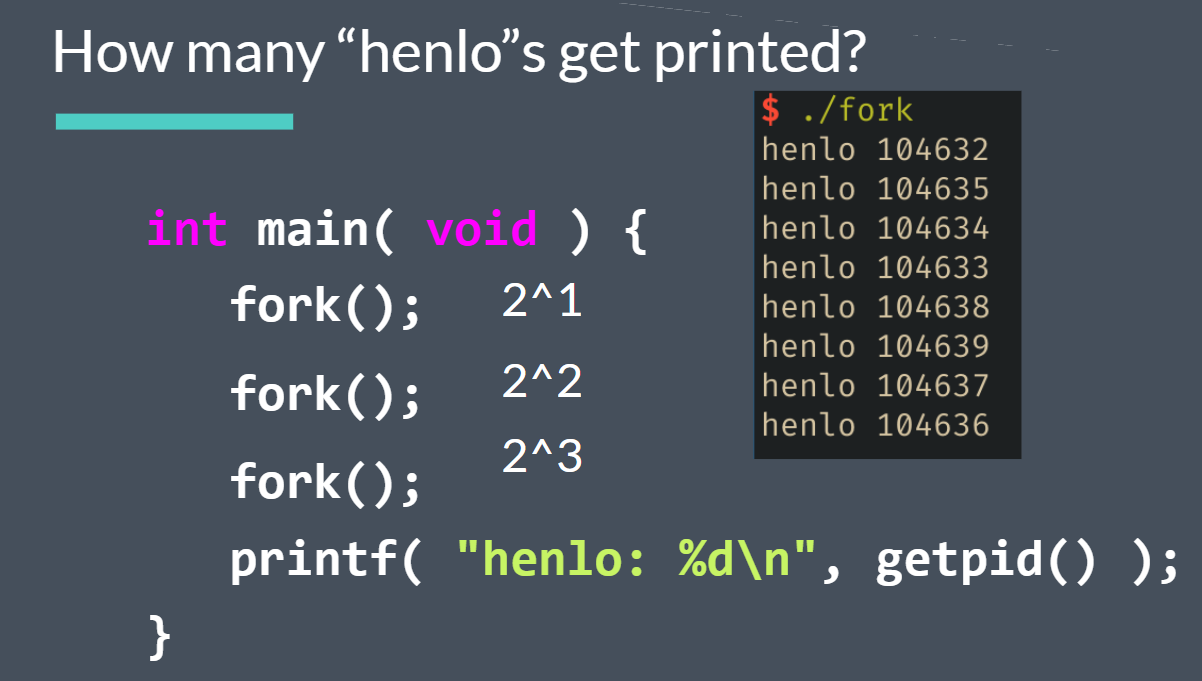
Use htop to monitor processes!
But… How is the first process created?
Kernel
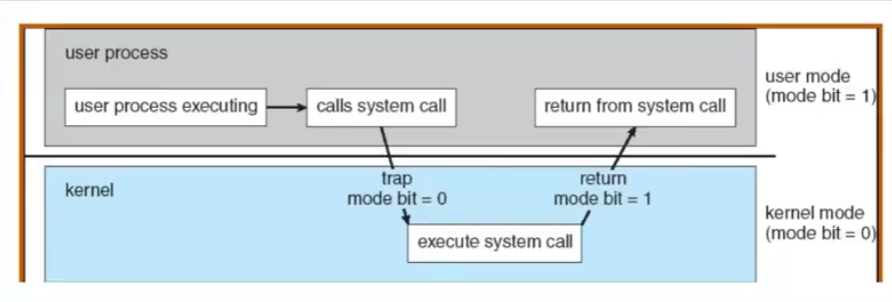
Kernel Code does not run in a process, but kernel creates the init process during boot
Init Process
- Started by kernel during boot
Manage Processes
- If parent exits first, orphan processes are re-parented to the init process
- Init waits on all processes
- Zombie processes can still occur if the parent never exits!
Manage Services
- We need a way to access the computer! Init will start some critical services
- Critical services include
- getty
- Display manager
- Ssh


What is service?
- A process that needs to be kept track of
- Often dameons, non-interactive background processes
- getty, sddm, sshd, httpd, nginx, postfix, etc.
- Need to be always running!
- If something is not running, we might not be able to access our computer
Systemd
What is Systemd
- An init system
- Most commonly used init system(the 1st process) on modern Linux systems
- Provides tools for users to manage services
systemctl- start, stop, check status, and morejournalctl- check systemd journal
- Also manages a lot more!
- logind, networkd, resolved, tmpfilesd, homed, …
- Service behavior defined by systemd unit files
- How should this service start up?
- How should it respond to various
systemctlmanagement commands? - When and how should this service stop, restart, reload and so on


Some Command
systemctl start [name]- starts a servicesystemctl stop [name]- stops a servicesystemctl restart [name]- restarts a servicesystemctl reload [name]- reload a service’s configurationsystemctl enable [name]- sets a service to start on bootsystemctl disable [name]- opposite of enable
Behavior for these commands may depend on the service, as defined in the unit file!